35+ checks. The 20+ that set your grade are grouped the way a customer experiences your site.
Intake
How easy it is to call, book, or send a message, especially on a phone.
Click-to-call, calls to action, contact forms, after-hours options
Visibility
Whether Google and AI assistants can find, understand, and recommend you.
Google Business Profile, titles & descriptions, service pages, structured data
Performance
How fast and stable your site loads on a real mobile connection.
Mobile speed & stability, image weight, HTTPS
Trust
The signals that make a stranger believe you.
Accessibility, privacy policy, signs the site is kept up to date
From your web address to a full report in about two minutes.
No account, no call, no credit card.
Start
Enter your website
Paste your website address. That's all we need, and the scan begins right away.
During the scan
We test your live site
Real tests on your live site: your pages, your speed on a phone, Google data and your email setup.
About 2 minutes
See your grade
Your A–F grade, a score for each section and your #1 issue appear right on the page.
Add your email
Open the full report
Every check, with the evidence and the fixes. It opens right away, and we email you a copy.
Up to 15 pages crawled, the ones a visitor would actually use
4 real-browser speed tests on a phone, 3 on a typical connection and 1 on a weak signal
3 Google data sources: PageSpeed, Business Profile and Web Risk
~35 email-security lookups: SPF, DKIM, DMARC and spam blocklists
35+ checks, 20+ of them graded
AI writes the plain-English summary. Every grade comes from real tests on your live site, not AI guesses.
Every check explained in plain English.
Each check says what we looked at, what we found and why it matters to a visitor deciding whether to call.
An overall A–F gradeOne honest read on where your site stands today.
A score for each sectionIntake, Visibility, Performance, and Trust, so you can see where the leaks are.
The top issues to fix firstRanked by how much they're likely costing you in calls and inquiries.
The full checklistPass, warning, or fail on every check, with the evidence behind it.
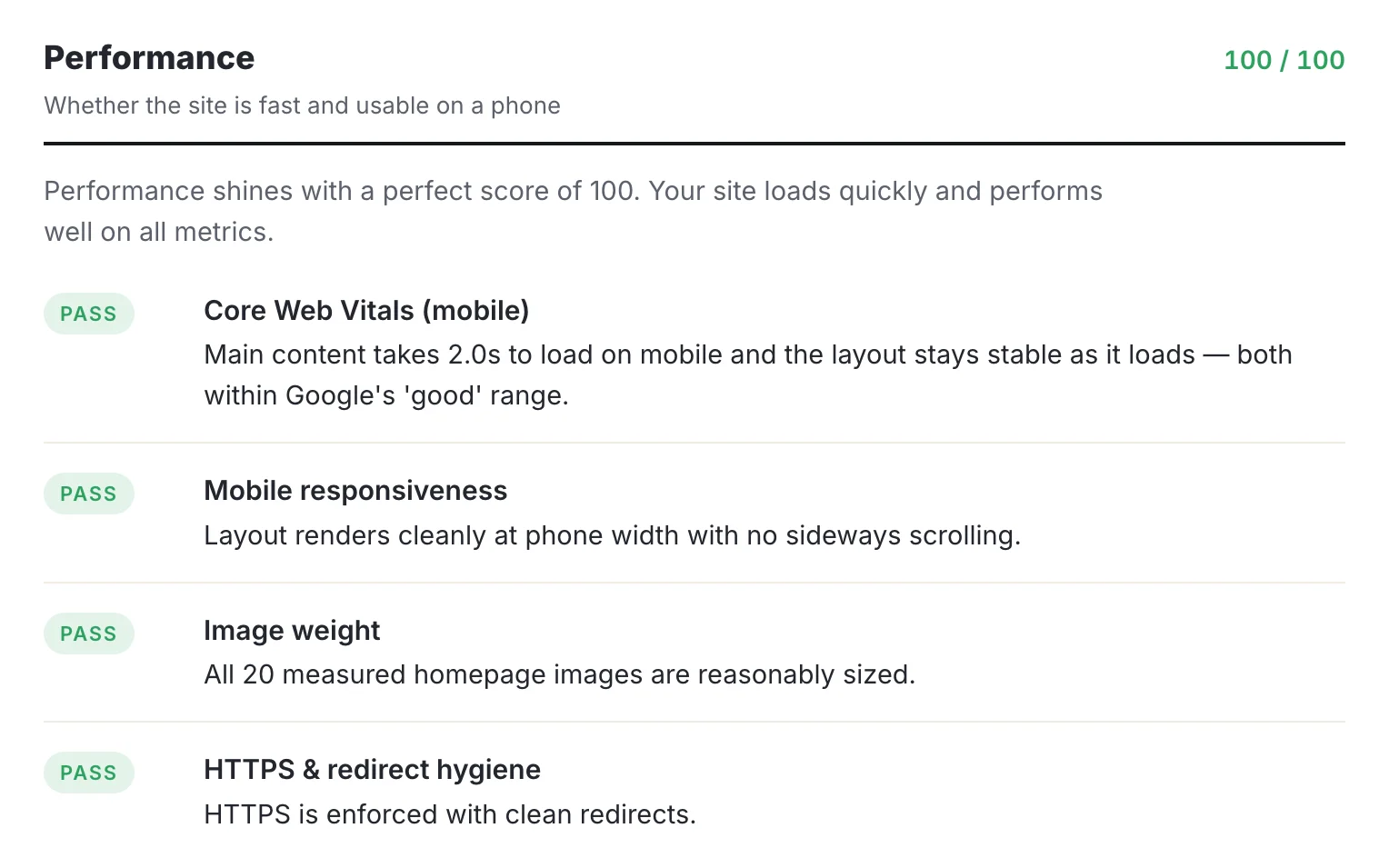
Bizlift Scorecard: longokura.com
One section of a real report: Performance for longokura.com, a Bizlift client. Your report covers all four sections, and your scores will be your own.
See your score, before your next client does.
Enter your website address. In about two minutes you'll see your grade and your #1 issue right here. Then add your email to open the full report. We'll send you a copy too.
Free, no credit cardNo sales call, just the reportAbout two minutes, on screen
Questions owners ask before they scan.
What does the Bizlift website scorecard check?+
35+ checks on your live site. The 20+ that set your grade cover four areas: Intake (click-to-call, calls to action, contact forms, after-hours options), Visibility (Google Business Profile, titles and descriptions, structured data, indexing), Performance (mobile speed and stability, image weight, HTTPS), and Trust (accessibility, privacy policy, signs the site is kept up to date).
We also check your email and site reputation: whether your domain is set up so your emails reach inboxes and can't easily be faked by spammers (SPF, DKIM and DMARC), whether your mail server, web server or domain is on a spam blocklist, and whether Google flags your site as hacked or dangerous (malware or phishing). These show up in your report but don't change your grade.
How long does a website scorecard take?+
About two minutes for most sites. Large or slow sites, or a short queue, can take a little longer. Your grade and #1 issue appear on this page as soon as the scan finishes. Add your email to open the full report right away; we also email you a private link to it that stays live for 30 days.
Why is my website slow on my phone?+
Usually because the biggest thing on the page, often a large photo at the top, reaches the phone late. Google's guide to optimizing Largest Contentful Paint splits that delay into four causes: a slow server response, the browser finding the image late (for example when it's set to lazy-load), an image file that's too large, and code that blocks the page from drawing. The Bizlift scorecard loads your homepage in a real mobile browser four times, once on a weak signal, and checks your image weight, so you can see whether you have a problem and where to start.
What's a good page load time in 2026?+
In 2026, Google's standard is still that a page's main content loads within 2.5 seconds. That's Largest Contentful Paint, one of Google's three Core Web Vitals. The other two: the page should respond to a tap or click within 200 milliseconds (Interaction to Next Paint), and the layout should barely shift while it loads (Cumulative Layout Shift of 0.1 or less). Google measures them at the 75th percentile of real visits, on mobile and desktop separately. For example, Long Okura's main content on a phone went from 6.0 seconds to 1.2 seconds after its Bizlift redesign.
How can I check my website speed for free?+
Google's PageSpeed Insights tests one page at a time for free, with a lab test and, when your site has enough visitors, real-user data from Chrome. The Bizlift website scorecard is also free: it uses Google's PageSpeed data, runs 4 real-browser speed tests on a phone, and adds the checks that decide whether a visitor calls (intake, visibility and trust), with an A–F grade in about two minutes.
Why do my business emails go to spam?+
Often because your domain isn't set up to prove your email really came from you. Three DNS records do that: SPF lists the servers allowed to send for your domain, DKIM signs each message, and DMARC tells inboxes what to do when a message fails. Since February 2024, Gmail requires every sender to use SPF or DKIM, and anyone sending more than 5,000 messages a day to use SPF, DKIM and DMARC. A mail server or domain on a spam blocklist causes it too. The Bizlift scorecard checks all of these and shows them in your report; they don't change your grade.
What is a website visibility score?+
In the Bizlift scorecard, Visibility is 30% of your grade: whether Google, and the people searching on it, can find you, understand what you do and trust what they see. It checks your Google Business Profile (rating, reviews, and whether your name, address and phone match your site), page titles and descriptions, whether each service has a real page of its own, structured data, and how recently you've posted. Our Visibility guide explains each check and what to do about it.
Is the scorecard done by AI?+
No. Every grade comes from real tests on your live site: we crawl your pages, load your homepage in a real mobile browser, run an accessibility scan, look up your email and DNS settings, and pull data from Google. The scoring is fixed rules, the same for every site. AI only writes the plain-English summary, and it can only restate what the tests found. If the summary doesn't pass that check, we use a standard written summary instead.
Is the Bizlift website scorecard really free?+
Yes. No credit card and no sales call. If you'd like help fixing what it finds, reply to the email or book a consultation. That's entirely up to you.
What happens to my email address?+
You don't need an email to see your grade and #1 issue. If you add one, we use it to open your full report and send you a copy. We don't sell it or share it.
Can I scan a competitor's website?+
Yes. The scorecard only uses public information (what any visitor, search engine, or AI assistant can already see), so the preview works for any public website, including a competitor's. It's a useful way to see how you compare. To keep the service fair, we limit how often any one site can be scanned.
Bizlift AI Chat
Online
This AI assistant provides general information only.